

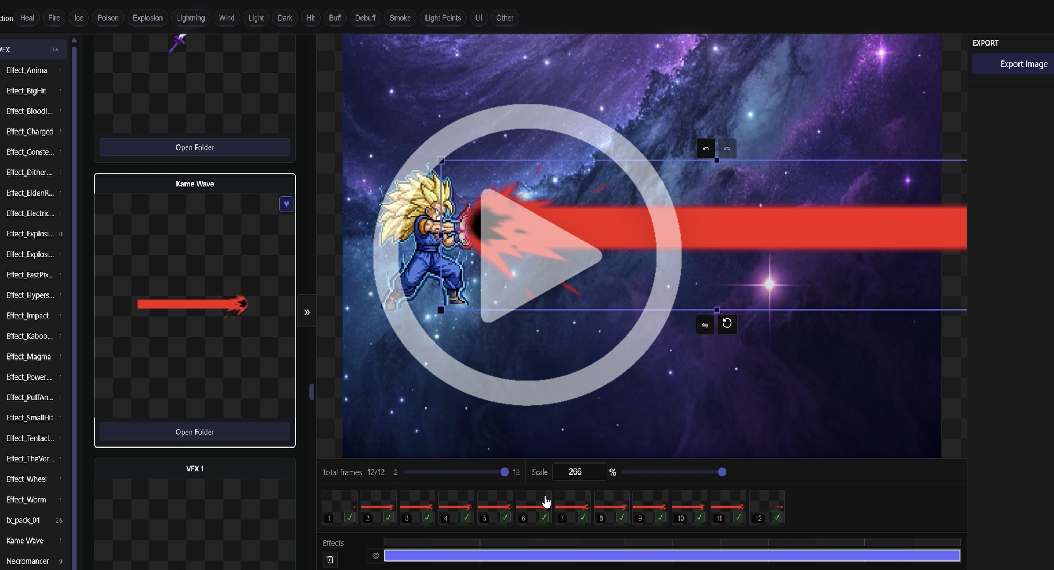
Watch VFXRun in 80 seconds
Do you have thousands of PNG sequences and GIF animations sitting on your hard drive, and dig through everything to find the right effect while making a game?
VFXRun can help you:
- Quickly browse your VFX assets
- Add backgrounds and characters, preview the effect
- Adjust effects
- Generate file formats your game engine needs
Completely free. No sign-up required. Share it if it helps.
Download for Windows
103 MB
Download for Mac
120 MB
Pro Plan
Help us decide what to build first. Leave your email and we will notify you when Pro trials open or voted features ship.
FAQ
- Does VFXRun Browser include VFX assets?
- No. It is a browser for your own local files — we do not sell or bundle third-party assets.
- Do I need to log in?
- No account is required to download or use the free version.
- Does it upload my files?
- No. Your local files stay on your device.
- Why does Windows show a security warning during install?
- VFXRun Browser is an early free release. The Windows installer is not code-signed yet. Therefore Windows SmartScreen may show messages such as “Windows protected your PC” or “Unknown publisher,” and the install button may be hidden at times. Only download from the official site vfxrun.com. If you have confirmed the installer came from our website, you can choose “More info” and then “Run anyway” to continue. We will apply for code signing once the product stabilizes to reduce these prompts.
- Why does macOS show a security warning during install?
- We are in an early release phase and do not yet have Apple Developer ID signing and notarization, so macOS may say the app cannot be opened because the developer cannot be verified. Only download from the official site vfxrun.com. If you have confirmed the installer came from our website, you can right-click the app in Finder, choose Open, and confirm once more. We aim to complete signing and notarization before the Mac release is fully launched.